Every feed, sleep and nappy
Breast and bottle feeds with amounts and solid foods, sleep sessions, diaper changes with colour and amount, and tummy time. Every Baby Buddy event type, logged the same way and synced to the same history.


BabyMate / Android
BabyMate
BabyMate is a native Android client for Baby Buddy, the free open-source baby tracker you host yourself. Every feature from the web app, plus one-handed timers, reminders, milestones and treatments, with your entries staying on your own server. The optional Coach turns those entries into forecasts and suggestions, worked out on your phone.
For Android 7.0 and later · Requires a self-hosted Baby Buddy server with HTTPS · US$0.99 one-time purchase · Optional Coach subscription with a 7-day free trial.
Full parity with Baby Buddy
BabyMate speaks the same Baby Buddy API as the web interface, so every record you see in the browser is here, and every change you make on your phone lands back on your server.
Breast and bottle feeds with amounts and solid foods, sleep sessions, diaper changes with colour and amount, and tummy time. Every Baby Buddy event type, logged the same way and synced to the same history.
Weight, height, head circumference and temperature, with BMI calculated from your measurements. Trends charts show the rhythm of days and weeks, including the longest stretch of night sleep.
Pumping sessions with output, notes for anything worth remembering, and tags to organise entries. The same records the Baby Buddy web app shows, editable from your phone.
Switch between children from the top bar. Each child keeps their own history, timers and rhythm, and BabyMate works with the user accounts your Baby Buddy server already has.
Start a feed or sleep timer on your phone and it appears in the Baby Buddy web app, and vice versa. Timers live on your server, so any caregiver can pick up where you left off.
Edit or delete any entry from your phone and the change lands on your server. Log offline and the write queue delivers entries when you reconnect, with a queue inspector so nothing is a mystery.
Beyond the web app
Native extras for the moments when you are holding a baby, not a mouse. These are the features free web-based trackers and the Baby Buddy interface itself don't give you.
Quick log from the Today screen, smart time presets for when you forgot to start the timer, nudge entries by 5 or 15 minutes, and resume a past log as a live timer. Tummy time gets its own timer on the lock screen. Built for 3 am with one free hand.
A feed due, a nappy to change, a long stretch awake or asleep, pumping, a timer left running, treatment doses, bath rhythm, milestone windows and birthdays. Each one can be turned on or off, and all are local notifications on your device, with no push server in the middle.
27 milestones with typical age windows from CDC and AAP guidance, from first smiles to first steps. Windows are nudges, never deadlines, and each milestone logs to your server as a tagged note.
Schedules at times of day or on intervals, dose logging with a tap, and pause and resume when a course ends. Treatments and doses are stored as tagged notes on your server, so they appear in the Baby Buddy web app too.
Home screen widgets for the day's summary and live timers, quick settings tiles, and app shortcuts straight into logging. Check the rhythm without opening the app.
Ten colour themes, each with a day and night palette, from Terracotta to Midnight. English, French, German, Dutch, Spanish and Hebrew, with right-to-left layout for Hebrew.
Coach · optional Premium
The Coach tab reads what you have logged and shows what usually comes next, how today compares with your usual days, and where your records sit next to public-health guidance for your baby's age. It all runs on your phone, from the entries on your own server.
Each estimate comes from your baby's own recent rhythm at the same time of day, with the range it usually falls in. A recorded pattern, never a target.
Feeds, bottles, nappies and tummy time compared with the 7-day average, with 14-day charts and a time-of-day strip. Days you didn't log are never counted as zero.
When yesterday stands out, such as fewer feeds or less sleep than usual, the Coach says so next to WHO, CDC or NHS guidance for your baby's age. An optional morning notification brings them to you.
Sleep, feeding, nappies and tummy time each get their own page. The tummy-time page shows today's minutes as a ring against the daily goal, with a timer one tap away.
Tap a question such as how much sleep last night or when the last feed was, and the answer comes straight from your entries. No AI model and no network: every number is one you logged.
Training, estimates and suggestions stay on the device. The Coach's model is encrypted, kept for about 60 days, excluded from backup, and wiped by Delete Coach data or signing out.
The app you buy once keeps every feature it shipped with. Nothing moved behind the subscription.
US$3.29 a month or US$25.99 a year in the US, A$4.99 or A$39.99 in Australia. Google Play shows the price in your currency before you subscribe.
Billed by Google Play only. No account with me, and no baby data goes to Google or to me.
Up close
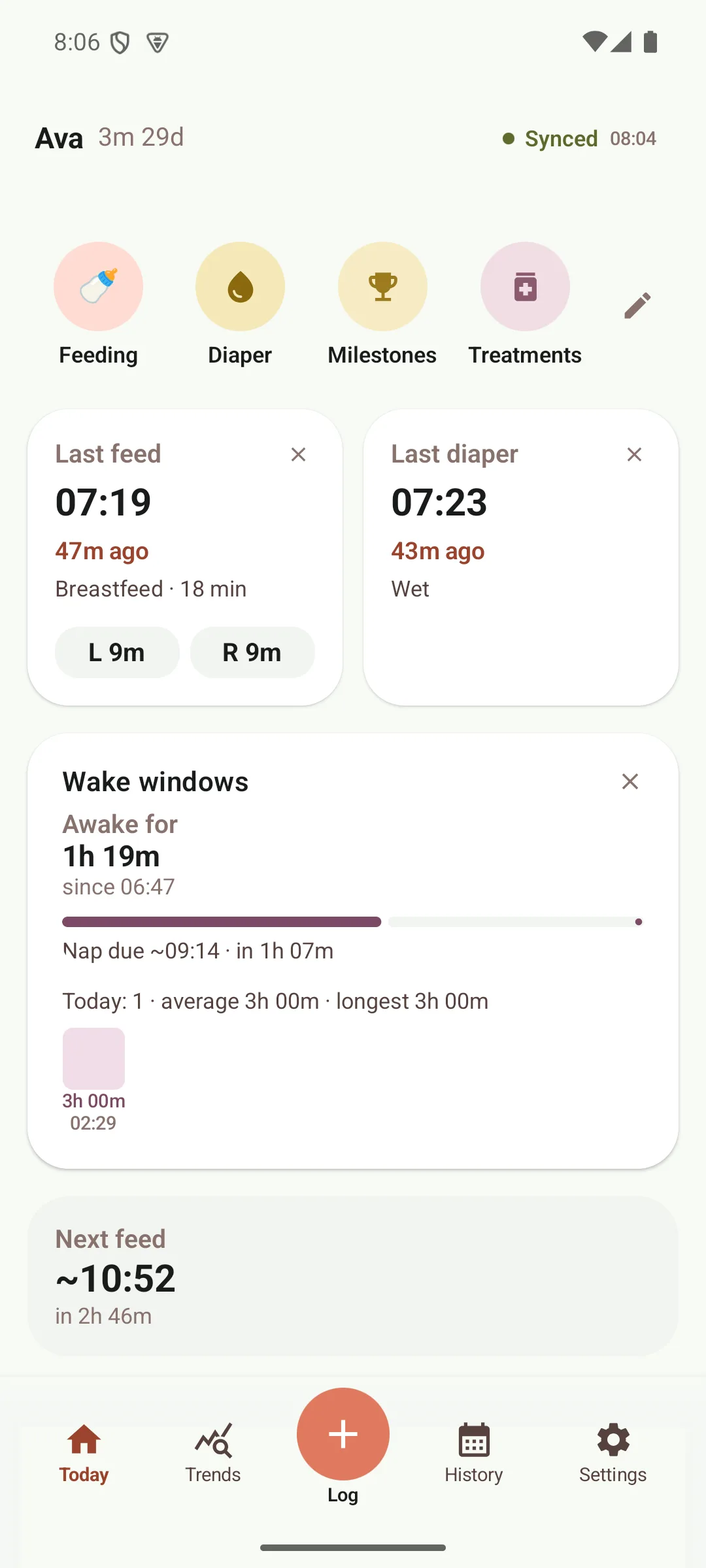
A calm terracotta palette by default, with nine more themes to choose from. Shown here in the default theme.
Live timers, the last feed, sleep and nappy, and the next reminder, all on one screen.
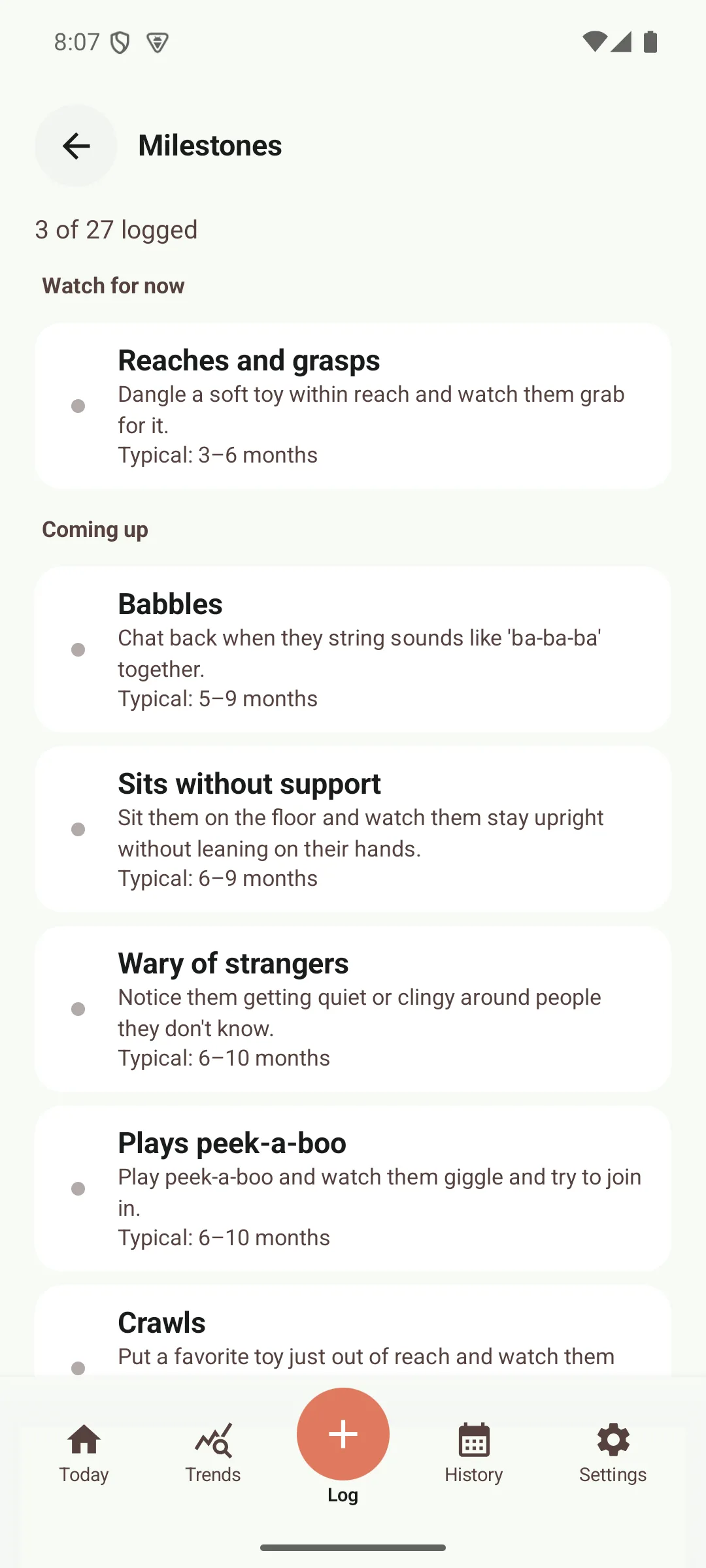
Typical windows from CDC and AAP guidance, logged as tagged notes on your server.
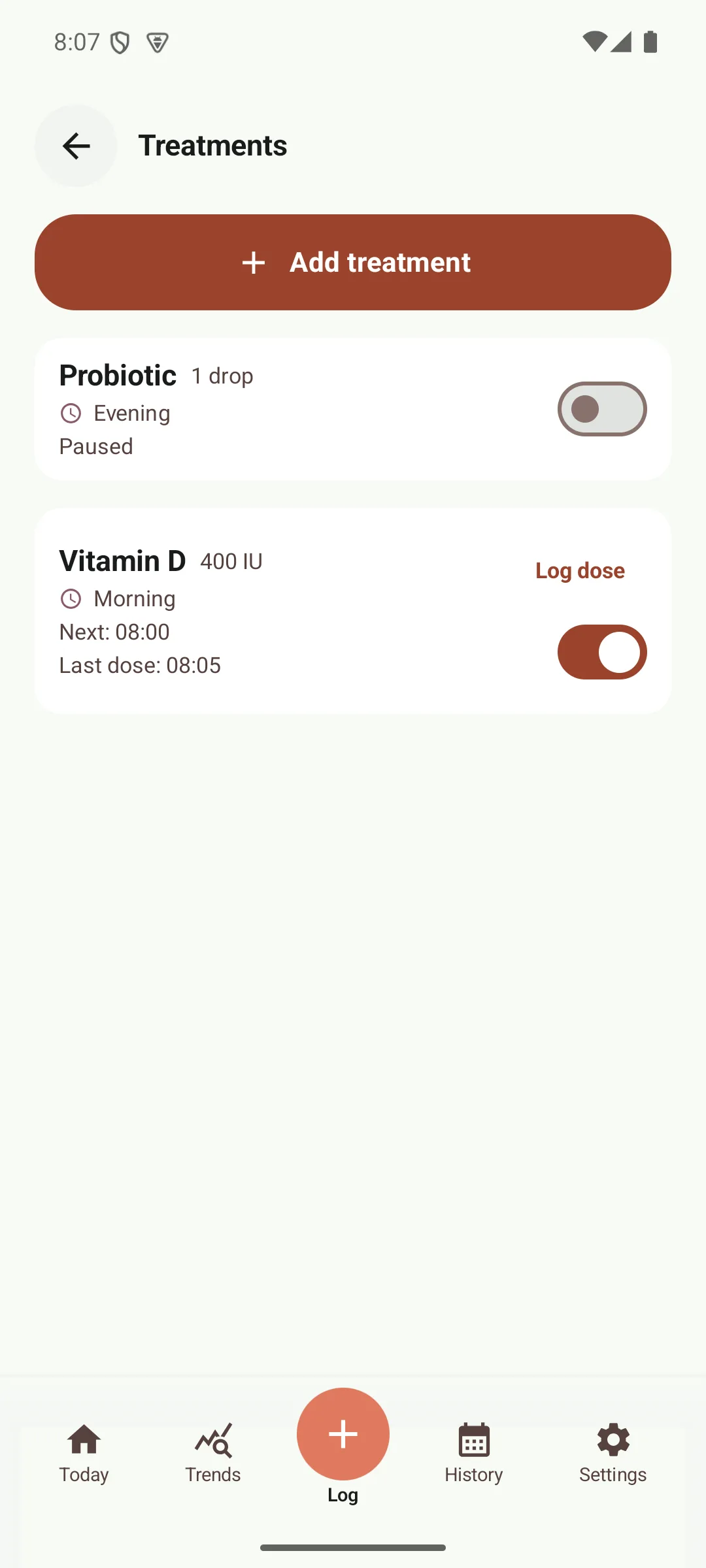
Times of day or intervals, one-tap doses, and pause when the course is done.
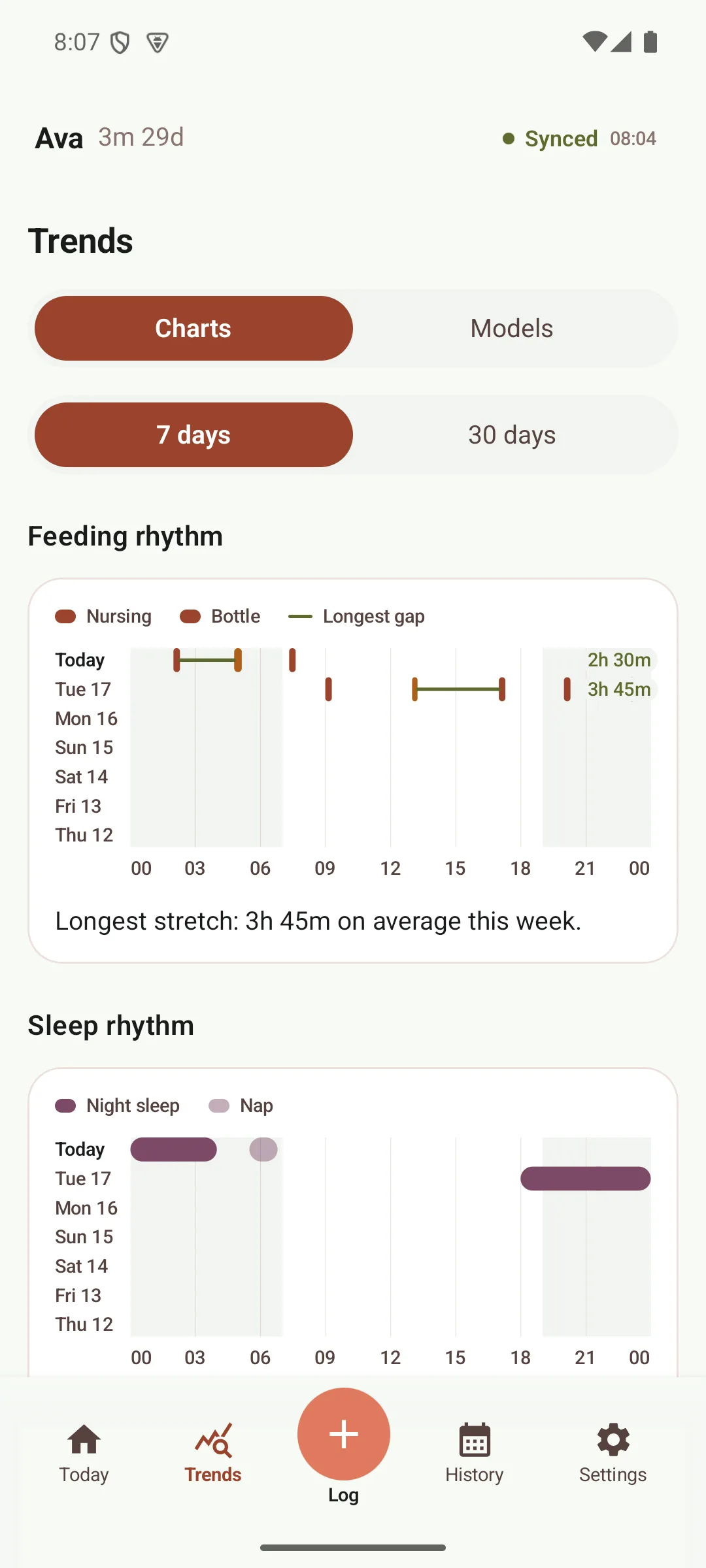
Feeding and sleep patterns, growth curves and the longest stretch of night sleep.
Try it in your browser
Flip through the Today dashboard, milestones, treatments, trends and the theme picker right in your browser.
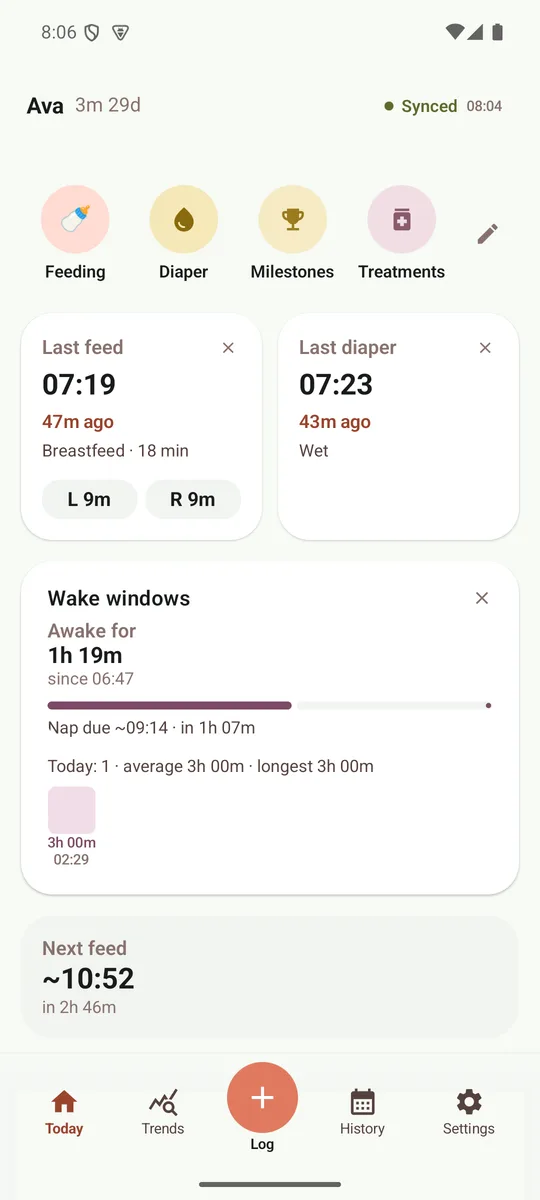
BabyMate keeps feeds, sleep, nappies, growth and reminders in one calm interface.
Turn on JavaScript to try the interactive preview.
Choose a view below to switch between the main screens.
Today screen.
Use the controls to switch between BabyMate's main screens.
Privacy in plain English
BabyMate has no ads, no analytics and no server of its own. It connects straight to the Baby Buddy instance you choose, and your API token stays on your device. Premium is bought through Google Play alone, with nothing about your baby attached.
Read the complete privacy policyYour Baby Buddy API token is sealed with AES-256-GCM using a key held in the Android Keystore. The key never leaves your device, and the credential store is excluded from cloud backup and device transfer.
There is no BabyMate server. Entries go straight from your phone to your Baby Buddy instance. The Google Play version requires HTTPS, even on a home network. Only the direct-download APK also supports plain HTTP. What your instance logs is up to its operator.
Notifications are scheduled on your device, and the Coach does its sums there too. No push service, no account with me, and nothing about your baby's routine is sent anywhere except the server you configured.
Suggestions and requests open your email app with an editable draft. App and device details are included for context, and nothing is sent until you send it.
Good to know
BabyMate supports Android 7.0 and later on phones and tablets, with layouts that adapt to larger screens. It is a native Kotlin app, so it stays quick even on older hardware.
Yes. BabyMate is a client for Baby Buddy, the free open-source tracker you host yourself. The easiest route is the official Docker image on a home server, NAS or Raspberry Pi. Once it is running, create an API token in your Baby Buddy user settings and enter the address and token in BabyMate.
Yes. The sign-in screen has a demo mode with sample data, so you can explore every screen without a server. Demo entries stay on your device and are never uploaded.
US$0.99 once on Google Play, and everything on this page except the Coach's Premium pages comes with it. BabyMate Premium is an optional subscription: US$3.29 a month or US$25.99 a year in the US (A$4.99 or A$39.99 in Australia), with a 7-day free trial for first-time subscribers. Google Play shows the price in your currency, and you can cancel anytime in Google Play.
No. BabyMate is not a medical device and does not diagnose, treat, cure or prevent any medical condition. The Coach compares your records with your own recent days and with general guidance from the WHO, CDC and NHS. If you are worried about your baby, talk to your doctor, midwife or child health nurse.
Yes. BabyMate uses the same API as the web app, so your children, history, timers, notes and tags are all there from the first sign-in. Changes sync both ways, and the web app keeps working alongside it.
Yes. Entries you log without a connection wait in a write queue and sync when you reconnect. The queue inspector in Settings shows exactly what is waiting, so nothing is lost in the background.
Built by Sam Russell for parents who run their own Baby Buddy, and everyone who wants their baby's data to stay theirs.
Baby Buddy is an open-source project of its contributors. BabyMate is an independent client; compatibility does not imply endorsement. Android and Google Play are trademarks of Google LLC. Apple, iPhone, iPad and Mac are trademarks of Apple Inc. Other product names belong to their owners.
BabyMate / iOS & iPadOS · Coming soon
BabyMate for iPhone, iPad & iPhone Duo
The initial Apple build brings BabyMate's native SwiftUI tracker to iOS and iPadOS: real Baby Buddy server and token sign-in, a built-in demo with two children and 14 days of sample data, child selection, Today, feed/sleep/nappy logging and editing, persistent on-device timers, recent history and 7/14-day trends.
Coming soon for iOS/iPadOS 15.0+ · Requires your own Baby Buddy server (or built-in demo mode) · Not on the App Store yet.
Initial Apple scope
BabyMate for iOS and iPadOS connects to your self-hosted Baby Buddy server for shared care records. Feed and sleep timers are different: they persist locally on each Apple device and do not live-sync between parents or devices.
Connect to a real self-hosted Baby Buddy server with an API token sealed in the iOS Keychain, or explore built-in demo mode with two children and 14 days of sample data.
Switch between children from the top bar and see the Today summary at a glance: local active timers, the last feed, sleep and nappy change, and recent care entries for the selected child.
Log and edit feeds, sleep and nappy changes. Persistent feed and sleep timers stay on this device, including across app relaunches; they are not shared Baby Buddy server timers and do not sync live to another parent or phone.
Filter, search and delete feed, sleep and nappy history from the most recent 30 days, and inspect 7-day and 14-day feeding and sleep trends for the selected child.
Adaptive compact, sidebar and two-column layouts move from a standard iPhone to iPad and wide/unfolded iPhone Duo screens, keeping local timers visible while you browse history or trends.
Settings includes a medical disclaimer: BabyMate is a tracking aid, not a source of medical advice. The initial Apple release is English-only and has no Premium billing. Android widgets and foreground timer services are not carried over.
iPhone Duo · the folding iPhone
On an unfolded iPhone Duo, BabyMate shows its sidebar, your entries and the one you picked on one screen.
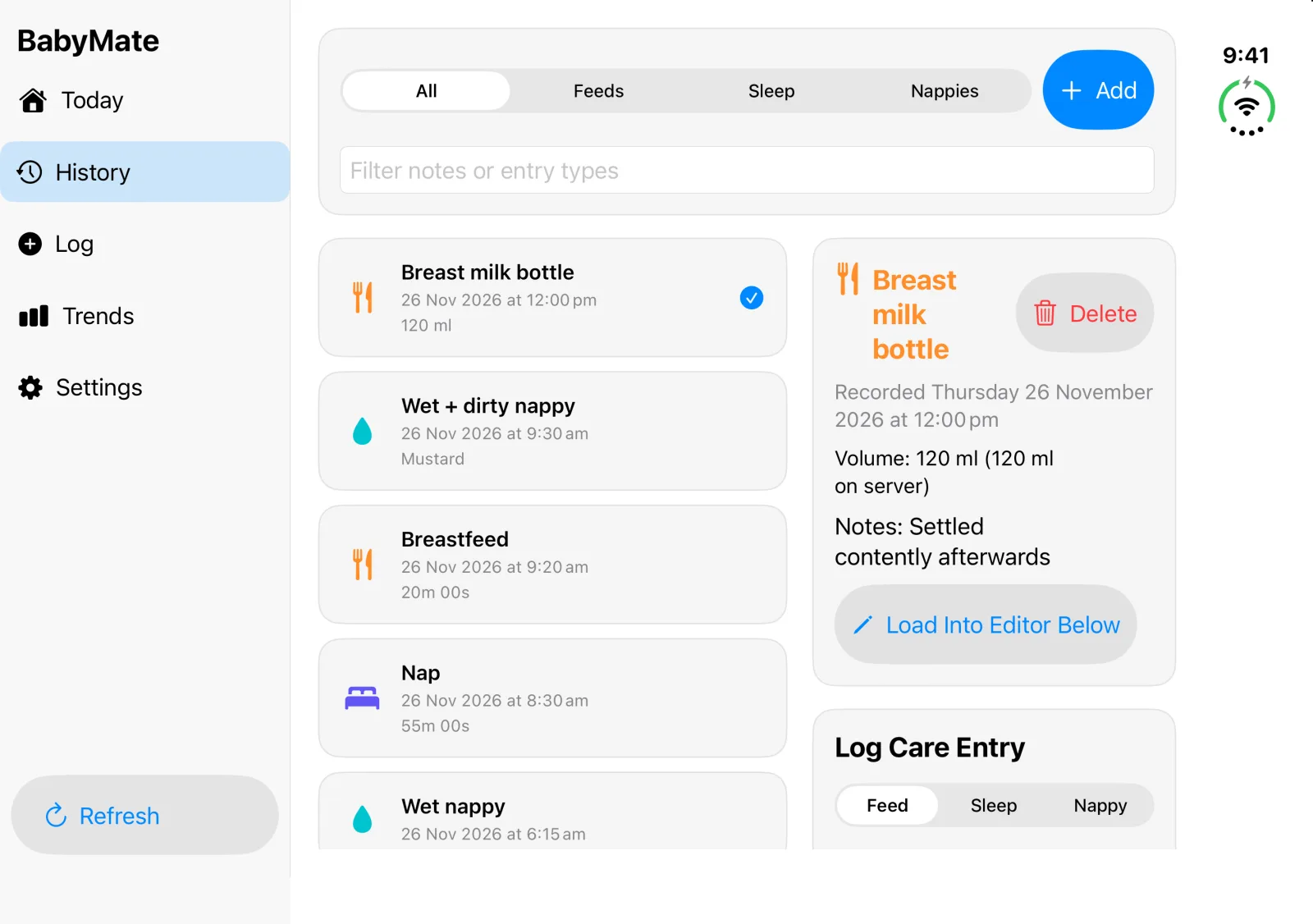
Preview of the iPhone version · demo data
Feeds, sleeps and nappies on the left, with the selected entry's details on the right.
BabyMate / macOS · Coming soon
BabyMate for Mac
Keep Today, persistent local feed/sleep timers, recent child history and 7/14-day trends open in a multi-column Mac window, connected straight to your self-hosted Baby Buddy instance.
Coming soon for macOS 13.0+ (Apple silicon) · Requires your own Baby Buddy server (or demo mode) · Not on the App Store yet.
Built for your desk
BabyMate on macOS shares the same Baby Buddy API and demo mode as iOS and Android, tailored for a wide desktop window.
Start, stop or edit feed and sleep entries with keyboard-friendly forms. Feed and sleep timers persist locally on this Mac; they do not continue from or live-sync to a phone.
Filter, search and delete the most recent 30 days of feed, sleep and nappy history, inspect 7/14-day trends, and switch children from the header bar.
Your Baby Buddy token stays in the macOS Keychain, and requests go straight to your server over HTTPS. The same settings and medical disclaimer are available on Mac.