
Copilot in Fabric and Power BI Cannot Repair a Weak Semantic Model
Copilot in Fabric and Power BI gives more people a faster path to the business logic inside a semantic model. That is the reward and the risk. A strong model becomes easier to use. A weak model produces confident mistakes at scale.
Microsoft's guidance tells model owners to repair inaccurate relationships and inappropriate aggregations before adding AI instructions.[4] I would treat that sentence as the release policy. Copilot can write DAX, suggest report pages and explain a result. The model decides what revenue means, which date counts, how tables relate and whose data a user can see.
Natural language removes the need to inspect the model. That makes validation more important, since a fluent answer makes a bad assumption harder to spot.
The model supplies the meaning
Power BI semantic models add business names, relationships and reusable metrics over enterprise data.[14] When a user asks for sales growth, Copilot selects fields and can create DAX for an ad hoc calculation.[8] A runnable query can encode the wrong definition.
Consider two measures, Sales and Sales Ex Returns, plus a report measure that excludes cancelled orders. A prompt for "sales growth" offers no safe way to choose. Duplicate names across Customer and Store tables add another guess. An inactive date relationship or incorrect cardinality can change the total when Copilot writes valid DAX. Microsoft tells authors to use clear names, distinct dates, sound relationships and reviewed measures for business-critical calculations.[4]
Hidden business rules create a deeper problem. A visual might filter to one region, use a report-level measure or treat the fiscal year in a way the model never records. Copilot cannot infer that context from a polished report. Move critical logic into reviewed model measures, record exclusions and units in descriptions, and remove duplicate variants from the AI schema.
Refresh adds the final failure mode. Microsoft says Power BI answers in Microsoft 365 Copilot reflect the most recent successful semantic model refresh rather than real-time data.[12] A failed refresh can turn correct DAX into yesterday's answer. Show the refresh time, assign an owner for failures and teach users to check both before acting.
Prep data for AI narrows the guessing
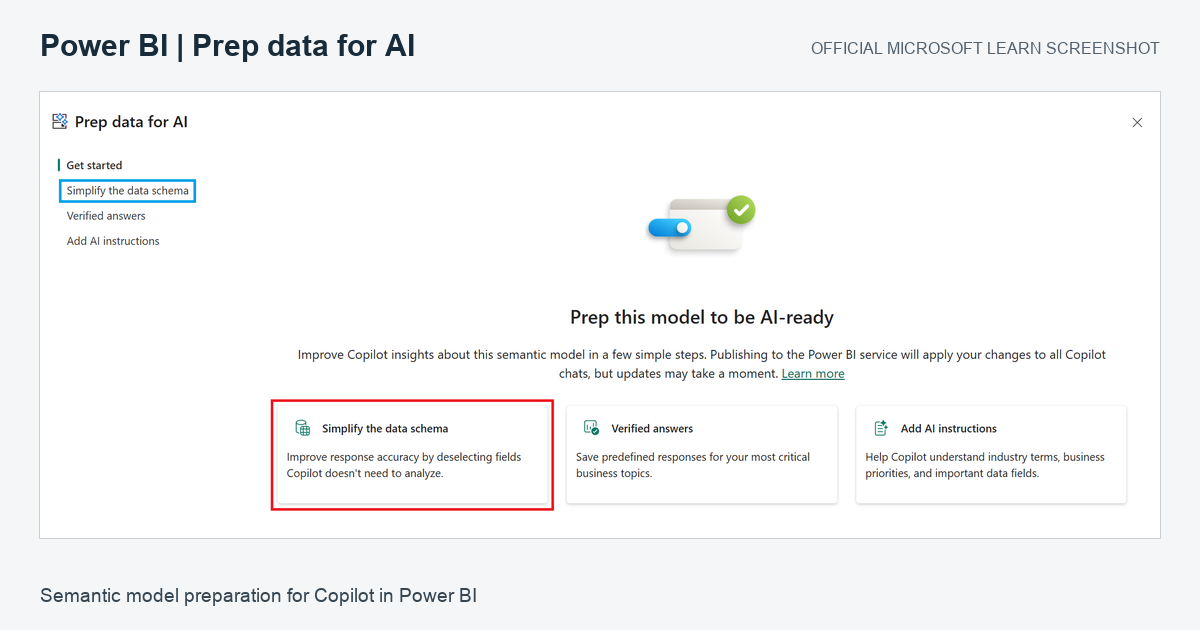
Prep data for AI, in preview, groups three tools in Power BI Desktop and the Power BI service: AI data schemas, verified answers and AI instructions. Authors can work in either surface, and consumers get the effects wherever Copilot in Power BI is available.[15]
An AI data schema gives Copilot a focused subset of tables, fields and relationships. Remove technical keys, duplicate measures and visual-specific calculations that invite the wrong choice. AI instructions record terms such as fiscal year or the approved treatment of returns. They guide interpretation. They cannot fix an invalid relationship or bad aggregation; Microsoft's guidance draws that line.[4]
Verified answers take a different approach. A human approves a visual and trigger phrases, then the semantic model stores that answer for matching questions. Copilot can show a verified checkmark, the matched phrase and "How Copilot arrived at this" with data and filter detail.[6] This gives high-value questions a curated path. It does not make every generated answer verified. Fabric IQ does not return verified answers, and Microsoft warns against treating the preview feature as an RLS or OLS security boundary.[6]
After testing, a model owner can select Approved for Copilot, the new name for Prepped for AI. The setting removes friction from standalone answers and can feed an admin restriction to approved items.[15] Treat it as an assertion backed by evidence, not as Microsoft certification.
Four experiences need different test plans
Report creation improves layout, not logic
Report creation and summaries help authors suggest content, create pages and produce narrative summaries from reports or selected visuals.[9] These features can improve presentation. A polished page can repeat a bad measure with a better layout.
DAX parsing checks syntax, not definitions
DAX assistance generates and explains queries and measure descriptions.[9] Microsoft's integration documentation says the DAX query view parses generated DAX and requests another response when parsing fails.[18] That check can reject broken syntax. It cannot decide whether finance accepts the business logic.
Fabric IQ exposes the query for review
Data questions with Fabric IQ give reviewers more evidence. Users can inspect reasoning steps, the underlying DAX query and the data table behind an answer.[8] Compare the selected fields, filters and date basis with a known result. This explanation feature deserves a place in every test script.
Data agents inherit the same model debt
Fabric data agents are configurable artefacts that query OneLake and semantic models through natural language. The feature has reached general availability, generates read queries and uses the requesting user's permissions.[11] The same model dependency follows. Microsoft says the data agent's DAX tool relies on semantic model metadata and Prep for AI configuration, while ignoring agent-level instructions for DAX generation.[16] Putting a better prompt around the agent will not rescue a weak model.
The name on the pane is changing
Microsoft's November update draws a line between the report features and the standalone experiences. Microsoft plans to end support for standalone Power BI Copilot on the web, Home, Teams and mobile by the end of January 2027. Formal deprecation and retirement dates remain unannounced. App-scoped Copilot will leave workspace apps in January, while report Copilot, web modelling and DAX query view remain supported.[20]
The planned replacement is Microsoft Copilot in Power BI and Microsoft Fabric, in public preview as of 23 November 2026. A Fabric administrator must enable the preview setting. Microsoft plans to switch that setting on by default and standalone Power BI Copilot off by default on 8 December, while preserving existing admin choices.[20][21] It uses Fabric IQ for Power BI data. Basic licences include Fabric IQ with limits, while premium licences add Work IQ for Microsoft 365 context.[21] Keep these names separate in design documents and training. The retirement changes the entry point, not the semantic burden.
Capacity buys compute, not confidence
For Copilot in Power BI, Microsoft lists paid Fabric capacity at F2 or higher, or Power BI Premium at P1 or higher, plus the tenant setting and a supported region. Trial capacities and free SKUs lack support. A Pro or Premium Per User licence alone does not meet the capacity requirement.[1]
A Fabric Copilot capacity can centralise billing for assigned users and extend Copilot support to Pro and PPU workspaces.[3] Australian tenants need another governance check. Microsoft's region table places Azure OpenAI processing for Australian capacities in the US and requires the cross-geography processing setting.[2]
The preview Microsoft Copilot path has different entitlement rules. Users need permission and licensed access to the content, but no F SKU for this scenario. Fabric IQ and Work IQ depend on the user's Copilot licence.[21] Record the exact experience before writing a licensing statement. Capacity spend cannot establish metric quality.
Security filters access, not meaning
Microsoft Copilot in Power BI and Fabric uses the signed-in user's permissions, and RLS and OLS continue to govern access.[21] Fabric data agents use Read permission on the semantic model, with RLS and column-level security in force.[11] Test each consumption path with users who hold different roles. Include a case where verified answers contain protected data, since Microsoft flags preview limitations in that path.[6]
RLS gives a user the right rows. It cannot define net revenue. A regional manager can see the right region and receive the wrong margin.
A readiness scorecard for data leaders
Score each row from zero to its weight. Require evidence, not a verbal assurance.
| Area | Weight | Evidence required |
|---|---|---|
| Business definitions | 25 | A finance or operational owner accepts each critical measure. Descriptions cover units, exclusions and fiscal rules. Duplicate variants leave the AI schema. |
| Model structure | 20 | Authors document grain, keys, active relationships and date roles. Names distinguish fields such as Customer Name and Store Name. |
| AI preparation | 15 | An author trims the AI schema, records AI instructions and configures verified answers for common questions. Test evidence supports Approved for Copilot. |
| Security and privacy | 15 | Tests prove RLS and OLS for each user and surface. The team reviews verified-answer limits, cross-geography processing and sensitivity controls. |
| Freshness and capacity | 10 | Users can see the last successful refresh and the owner for failures. A capacity admin tracks Copilot consumption. |
| Validation and accountability | 15 | A test set covers the expected measure, grouping, date basis, filters and result. A named reviewer signs each high-impact release. |
My release gate starts at 85 for a broad pilot. Scores from 70 to 84 suit a bounded pilot with model remediation underway. Below 70, fix the model before broad exposure. Any security miss blocks release at every score. These thresholds are my recommendation, not a Microsoft standard.
Human sign-off closes the remaining gap. A finance owner should compare the answer with a certified report, inspect the DAX or data table and check refresh before a journal, forecast or payment. An operational leader needs the same discipline before staffing, inventory or customer action. Microsoft warns that outputs can be inaccurate and nondeterministic.[18][21] A verified answer covers a trigger and visual, not every downstream decision. Accountability stays with a person.
My bet: AI readiness becomes a formal quality gate
By the end of 2027, AI readiness will sit beside performance and security as a formal semantic-model quality gate. Microsoft supplies Approved for Copilot and an admin restriction to approved items.[15][21] I expect deployment pipelines to demand test evidence before a model earns that label and moves to production.
My recommended gate needs three signatures: model owner, metric owner and security owner. Store test questions, expected results, RLS cases, refresh evidence and a review date with the model. Repeat the tests after measure, relationship, source or AI instruction changes. Block promotion when the evidence fails.
Copilot will improve at language and DAX. That progress raises the value of semantic discipline. I would fund the model review before buying more capacity.
Image: Microsoft Power BI Prep data for AI screenshot. Used with permission from Microsoft. Complete documentation screenshot resized without cropping, with a neutral title and caption; no live tenant testing. Screenshot usage guidelines.
Sources: [1] Copilot for Power BI overview (Microsoft, 2026); [2] Overview of Copilot in Fabric (Microsoft, 2026); [3] Fabric Copilot capacity (Microsoft, 2026); [4] Optimize your semantic model for Copilot in Power BI (Microsoft, 2026); [6] Prepare your data for AI: Verified answers (Microsoft, 2026); [8] Ask data questions with Copilot and Fabric IQ (Microsoft, 2026); [9] Use Copilot with Power BI reports and semantic models (Microsoft, 2026); [11] Fabric data agent concepts (Microsoft, 2026); [12] Fabric IQ in Microsoft 365 Copilot Chat (Microsoft, 2026); [14] Semantic models in Power BI (Microsoft, 2026); [15] Prepare your data for AI (Microsoft, 2026); [16] Semantic model best practices for data agent - Microsoft Fabric | Microsoft Learn (Microsoft, 2026); [18] Copilot in Power BI integration overview (Microsoft, 2026); [20] Power BI November 2026 Feature Summary (Microsoft, 2026); [21] Copilot in Power BI and Microsoft Fabric (Microsoft, 2026)
Connect with me on LinkedIn.
A note on the process: I used AI to help with research, drafting and editing. I checked factual claims against Microsoft documentation on 23 November 2026. I did not run tenant-side tests.