How I Run My Home Lab Like a Small Production Environment
I run my home lab as a small production environment. Not because the house needs enterprise architecture, but because the habits transfer: monitoring, backups, safe access, recovery paths, update policy, and enough automation that a reboot does not become a manual rebuild.
This is a sanitised version of the setup. I have removed hostnames, addresses, domains, paths, usernames, room IDs, credentials, and anything else that would identify the environment. I have also left out the media download stack on purpose. Plex is included because it is the user-facing media service; the automation behind it does not need to be public.
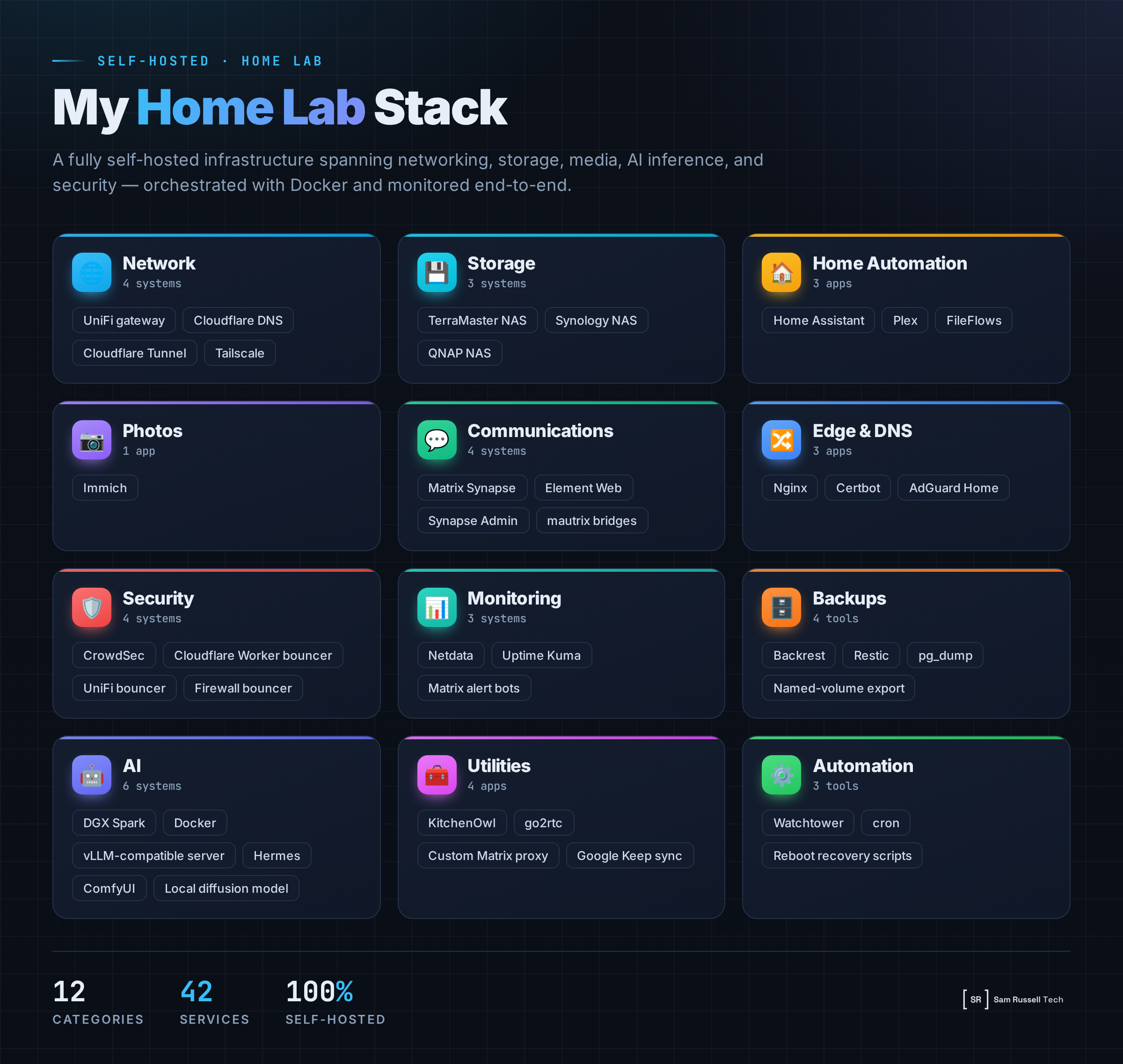
The stack at a glance
| Area | Apps and systems | What they do |
|---|---|---|
| Network edge | UniFi gateway | Routing, Wi-Fi, firewall rules, port forwarding, segmentation, and gateway-level blocking. |
| DNS and ingress | Cloudflare DNS, Cloudflare Tunnel | Public DNS, secure ingress for selected services, edge filtering, and fewer open ports. |
| Primary storage | NAS with Docker | Main storage, application hosting, backup control, monitoring parent, and general self-hosted workloads. |
| Secondary storage and proxy | NAS with Docker, Nginx, Certbot | Reverse proxy, TLS renewal, communications services, secondary DNS, and selected public-facing routes. |
| Storage expansion | QNAP NAS | New storage target and migration path for the media library. |
| DNS filtering | AdGuard Home | Network DNS filtering, tracker blocking, and internal DNS overrides. |
| Remote access | Tailscale | Private admin access without exposing management ports. |
| Password vault | Vaultwarden | Self-hosted password management with controlled account creation. |
| Photos | Immich | Photo uploads, thumbnails, search, local ML features, and private library ownership. |
| Media | Plex, FileFlows | Media library, streaming, and file processing workflows, backed by storage, monitoring, and a migration plan. |
| Home automation | Home Assistant | Device control, dashboards, sensors, automations, alerts, and integration testing. |
| Streams | go2rtc | Local camera and real-time stream handling. |
| Household tools | KitchenOwl | Shared household and grocery management. |
| Communications | Matrix Synapse, Element Web, Synapse Admin, mautrix bridges | Private messaging, admin tooling, platform bridges, and the alert bus for the lab. |
| Monitoring | Netdata, Uptime Kuma | Host metrics, container metrics, uptime checks, and endpoint monitoring. |
| Alerting | Matrix bot accounts | Backup results, uptime failures, update notifications, system events, and security alerts. |
| Backups | Backrest, Restic, pg_dump, volume export scripts | Snapshot backups, database dumps, named-volume exports, retention policy, and restore workflows. |
| Updates | Watchtower | Automatic updates for low-risk containers and monitor-only alerts for fragile services. |
| Security | CrowdSec, Cloudflare bouncer, UniFi bouncer, firewall bouncer | Log analysis, ban decisions, gateway blocking, edge blocking, host blocking, and notifications. |
| Local AI | Hermes Agent, vLLM-compatible server, Docker | Private OpenAI-compatible LLM API, agent runtime, tool execution, and local automation workflows. |
| Image generation | ComfyUI | Local image generation workflows and model testing. |
| Scheduled automation | Cron | Reboot recovery, cleanup tasks, database exports, and small health scripts. |
Why I split the lab across systems
The most useful design choice has been separating storage-heavy workloads from public-edge workloads. The primary NAS does the heavy lifting: data, containers, monitoring, backups, and services that need local disk access. A second system handles reverse proxying, TLS, communications, and public-facing routes.
That split keeps the storage box from becoming the front door for everything. It also gives me a cleaner failure model. If I break a proxy rule, I should not be risking the data layer. If a storage job is busy, it should not make the public edge fragile.
The new storage target is there for migration and expansion. I do not treat that as a one-off copy. Once a device holds important data, it needs to enter the operating model: monitored, backed up, documented, and tested.
The edge should stay small
The gateway does routing, firewall policy, Wi-Fi, and selected forwarding. It does not become the admin interface for the whole lab.
Remote access goes through a private mesh VPN. Selected public services go through Cloudflare Tunnel or a controlled reverse proxy path. Internal DNS keeps local traffic local where that makes sense. That matters for services like photo uploads, where sending local mobile traffic out to the internet and back is wasteful and slow.
Nginx acts as the front desk. It terminates TLS, routes requests, and keeps application containers away from the public edge. Certbot renews certificates through DNS validation, so certificate renewal does not require opening extra challenge endpoints.
Home Assistant is the practical control plane
Home Assistant is the part of the lab that turns infrastructure into daily utility. It gives me device control, dashboards, automations, sensors, alerts, and a real testbed for integration work.
The small loops matter most. Sensors feed dashboards. Dashboards expose the controls people need. Automations remove repeated actions. Alerts tell me when something needs attention. Custom integrations fill gaps when commercial products do not talk to each other cleanly.
Home Assistant also punishes sloppy engineering. A bad automation annoys real people. A fragile integration fails in the middle of normal life. If something is too brittle for the house, it needs better error handling.
My favourite automations
- Every light in the house follows presence and illumination, so no one needs to touch a light switch.
- The grass and gardens water themselves when they need it, but skip watering when rain is on the horizon.
- Bathroom humidity gets controlled automatically, room by room.
- Music follows people through the house when it makes sense, including playback from the turntable.
- The pool tops itself up when the water level drops.
- I can ask Home Assistant Voice to add something to KitchenOwl, and it lands on the shopping list without opening an app.
- When I get to a supermarket, a location-based notification shows the current shopping list.
Plex is the visible media service
Plex is the part of the media setup people actually see. The rest of the media download automation is deliberately out of scope for this post.
Plex still makes a useful infrastructure test. It depends on reliable storage, sensible library paths, configuration backups, hardware-aware transcoding, and a migration plan when storage changes. Large files, metadata scans, remote clients, and background jobs find weak storage design fast.
Immich made photos an owned service
Immich moved photos out of the category of someone else’s platform and into the lab. Mobile uploads, thumbnails, search, and local ML run on hardware I control.
Photos demand a higher backup standard than replaceable media. The library, database, generated assets, and application config all need a restore path. A photo service is not healthy because the web UI loads. It is healthy when I can restore it and trust the result.
Matrix is the alert bus
Matrix started as a communications service, but it has become the operations room. Synapse provides the homeserver, Element gives me a web client, and bridges connect selected external messaging platforms.
The bigger win is alerting. Backup jobs, uptime checks, container updates, security decisions, SSH events, and system scripts all report into private rooms. I do not want five dashboards open to know if the lab is healthy. I want the lab to tell me when something changed.
Monitoring is not the same as uptime
Netdata and Uptime Kuma answer different questions. Netdata tells me what the hosts and containers are doing. Uptime Kuma tells me whether services can be reached.
You need both. A host can look fine while a login page is broken. A service can respond while the storage layer is running out of space. I also tune alerts for the environment. Media processing can legitimately use a lot of CPU. Storage caches can create scary-looking backlog patterns during normal operation. Alerting should reduce uncertainty, not create noise.
Backups are only useful if restore is designed
Backrest and Restic handle snapshot backups. The backup plan includes the important data and excludes junk: active working directories, caches, container overlay layers, and anything that would make restores slower without adding value.
Some container data needs extra handling. Databases and named volumes do not always become safe backups just because their files were copied. I use export scripts for database dumps and volume archives so the backup system captures something I can restore with confidence.
The restore path is the product. Stop the service, restore config, restore the database or volume export, start the service, verify it. If I cannot explain that path, the backup is not finished.
Updates need risk tiers
Watchtower handles container update checks, but not every container gets the same policy. Low-risk services can update automatically. Fragile services run monitor-only. Locally built or pinned images stay out of automated update checks.
Auto-updating everything is reckless. Manually updating everything sounds safe until you stop doing it. Risk tiers give me a workable middle ground: update the boring stuff, warn me about the risky stuff, and avoid noisy checks for images that should not change.
Security needs detection and enforcement
CrowdSec gives the lab a feedback loop. It analyses logs, creates decisions, and pushes those decisions to enforcement points.
The useful pattern is layered enforcement. Some decisions can apply at the cloud edge. Some can apply at the gateway. Some can apply at the host. The goal is not to pretend a home lab is an enterprise SOC. The goal is to practise the loop: detect, decide, enforce, notify, review.
Local AI is now part of the lab
The local AI box runs two kinds of workload. One is a vLLM-compatible server that exposes a private OpenAI-style API for LLM experiments and agent workloads. The other is ComfyUI for local image generation.
Those workloads compete for memory, so I use scripts to switch modes. That sounds simple, but it is the kind of operational habit that matters. Make the desired state explicit. Script the transition. Test the health check. Do not rely on remembering which process should be running.
See more: DGX Spark: Running Production AI on a $3,000 Desktop
Hermes is the operator layer
Hermes is where the lab stops being a set of dashboards and starts behaving like an operator. I use it as the agent layer that can read context, call tools, run commands, write code, and turn a problem into a change I can review.
The useful part is the number of systems it can reach. It connects into Home Assistant through MCP-backed tools, works with GitHub for repos, issues, pull requests, and releases, and can query UniFi when I need network state instead of guesswork. It also has access to local files, shell commands, browser checks, scheduled jobs, and the notes/memory layer that carries context between sessions.
That changes the operating model. If an integration breaks, Hermes can inspect the logs, patch the repo, run tests, open the PR, and help me release it. If the house has a problem, it can look at Home Assistant state and the surrounding infrastructure instead of answering from memory. The AI box provides the local model capacity. Hermes gives that capacity hands.
Cron still earns its place
Not every job needs a platform. Cron handles the small tasks that keep the lab from depending on my memory: reboot recovery, cleanup jobs, database exports, and system event checks.
Those scripts are boring right up until they do not exist. Then the same manual fix comes back after every reboot.
The operating model matters more than the apps
The apps will change. The hardware will change. The useful part is the operating model.
A home lab becomes valuable when it has clear ingress paths, private admin access, monitored services, working backups, tested restores, alert routing, update policy, security feedback loops, documented recovery steps, and enough automation to survive a normal failure.
That is why I keep building it. It is a place to practise production thinking with real users, real data, and real consequences, without waiting for a business case.
Connect with me on LinkedIn.