
Copilot in PowerPoint Can Now Turn Text Into Slides
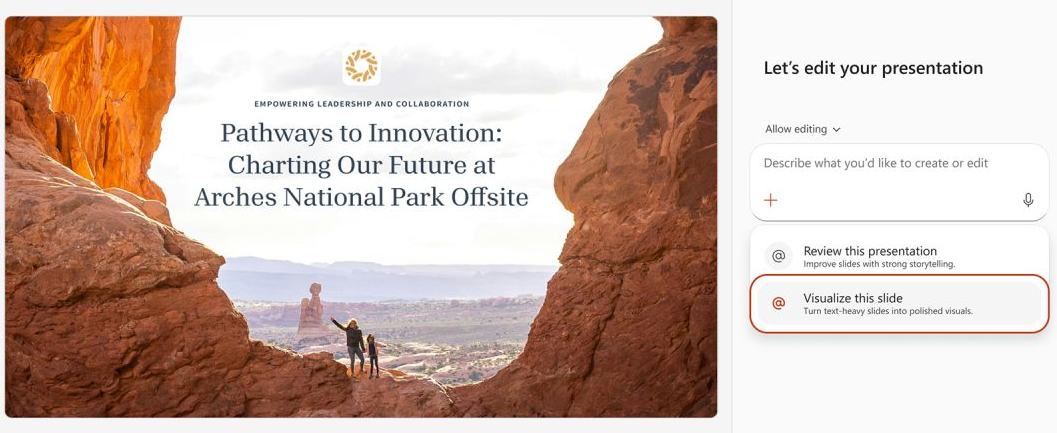
Microsoft has added a new Copilot skill in PowerPoint for Windows desktop called “Visualize this slide.” You select the skill, Copilot reads your text, and it produces a slide with layout, imagery, and structure instead of the default bullet-point dump.
The rollout is happening this month. It is enabled by default for anyone with a Copilot licence. There is no admin setup, and it operates inside your existing compliance policies. That means most enterprise users will get it without anyone in IT having to approve or configure anything.
What it actually does
The feature targets a specific frustration: slides that are dense with text, structured badly, and hard to read from the back of a room. Copilot takes that wall of text and applies built-in layout logic. It arranges headings, breaks content into visual blocks, and inserts relevant imagery from stock sources.
In practice, it turns a slide that looks like a document page into something that resembles actual presentation design. For users who are not trained in slide composition, that is a real upgrade over the default path of pasting paragraphs into content placeholders.
Where it still falls short
Automated layout is useful, but it is not presentation craft. The tool does not know your audience, your narrative arc, or the decision you are trying to influence. It will clean up a messy slide. It will not necessarily help you tell a better story.
There is also the question of imagery. Stock photos selected by AI often look generic. They can fit the topic without adding meaning. A strong presentation usually needs visual choices that are specific to the message, the organisation, and the moment. That is where automated assistance ends and deliberate design begins.
The human layer
A great deck still needs a human touch. Whether the goal is to win a pitch, secure budget approval, or teach an audience how to use something new, the structure of the argument and the clarity of the delivery matter more than clean layouts.
That is where Presentation Studio fits. It is a specialised presentation agency that works with teams and leaders to build and refine presentations. Their focus is on narrative, visual hierarchy, and coaching presenters so the delivery matches the material. If Copilot handles the slide mechanics, Presentation Studio handles the communication.
- Presentation Studio: presentationstudio.com
The useful middle ground
The smart approach is to use both. Let Copilot handle the rough conversion from text to structured slides, then apply human judgment to tighten the narrative, replace generic imagery, and adjust the flow for the specific audience. That keeps the boring formatting work short and preserves the parts of the process that actually persuade people.
For users who currently start with a blank slide and paste a wall of text, this Copilot skill is a good step forward. It will not replace a presentation designer or a communication coach, but it does remove some of the friction that keeps people from starting with a usable slide at all.
Connect with me on LinkedIn.